
- The importance of website speed
- How to test your website speed
- Some options for improving speed
Yes, speed is extremely important

In addition to just being bad branding, a slow website really does impact conversion. How often have you left a website because it was taking too long to load? There are lots of studies out there and most show that once your website takes more than 3.5 seconds to load, your conversion rate drops to less than half. Conversely, if you get page load to 3.5 seconds or less, you could more than double the amount of conversions it generates.
We can’t think of any other digital marketing project with such a high payoff.
Testing your website loading speed
There are 2 main methods:
- Use a page speed scanner, such as Pingdom, PageSpeed Insights or Chrome’s Lighthouse report.
- Use quantitative/actual user data, for example custom dimensions in Google Analytics or the Google Search Console Core Web Vitals report.
You’d want to use a combination of both, unless you’re just launching or your website is low-traffic in which case #2 won’t help much.
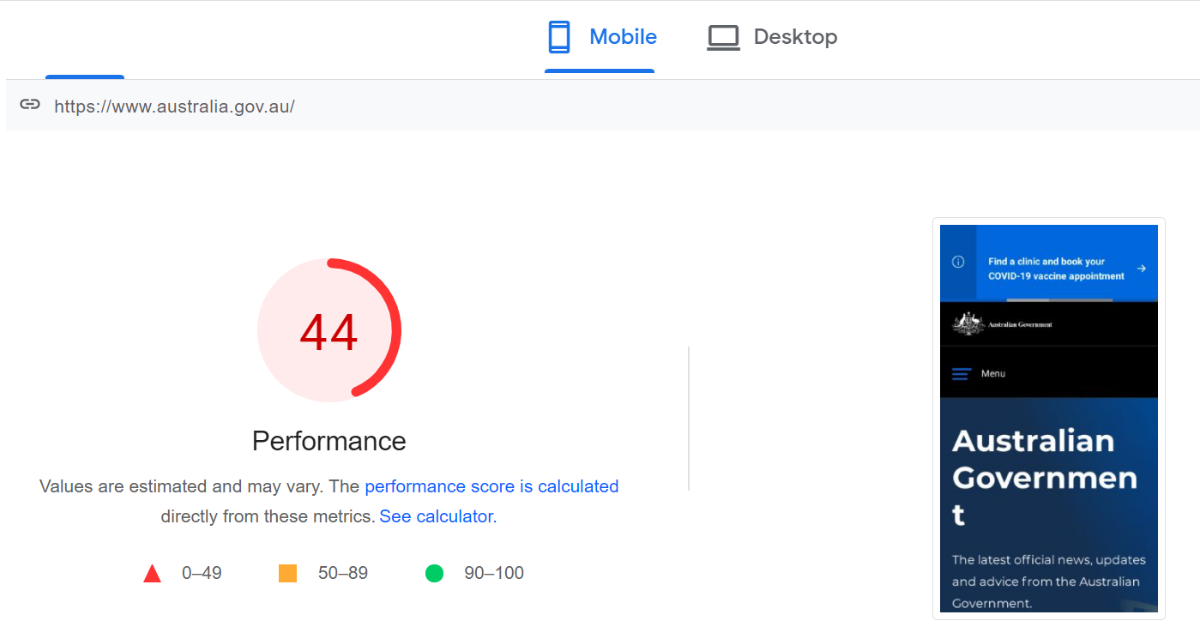
Website speed is also a factor in search engine rankings
The largest initiative is the Core Web Vitals initiative, spear-headed by Google. It doesn’t only look at speed; as of 2021, the main signals evaluated are:
- How long does it take the largest element on the screen to load?
- How much does the screen jump around as your page loads?
- How long does it take between a user interacting with your website (eg. clicking on a link or form element) before it responds?
We’ll now go over some things that are generally a good idea for most websites. The list isn’t complete and the scanning tools will provide a lot of technical details but it can be hard to make sense of everything without more context.
Hosting
Your quality of hosting (including hosting plan) and the host’s location can make a huge difference. If your host is slow then getting everything else right might not make much difference. If you’re using a CMS with fully managed hosting (eg. Squarespace, Shopify, Wix) then many some of the tips below may not be necessary as the CMS may do it for you. However there’s a chance that you may still need some add-ons, and if you are self-hosting you should consider all of these points about your hosting setup:
- Have an adequate plan: If you are on a shared hosting plan, once your website starts scaling in demand, you’ll find that the speed to consistently be an issue. Upgrade to a VPS or other higher-tier plan.
- Use a Content Delivery Network (CDN): This is a service which acts as a layer between your host and the internet to optimise the delivery of files to the user’s browser. For more information, see this article by Cloudflare, a CDN with a free-forever plan which may be suitable for a lot of smaller websites.
- Don’t double up: Remember to check what speed optimisations your host and CDN implement automatically, because then you don’t need to implement them yourself as well. Not only would it be a waste of time, but doubling up can actually make your website slower.
Images
Many images are too large for what you need, meaning wasted bandwidth. It’s common these days for a standard image from your phone (ie. not a professional device) to be around 10MB. To put this into context, that one single image is 4 times larger than the ABC’s entire homepage, which has dozens of articles (with images) at any time! Often we’d see such an image then used in something like a thumbnail where you can get the same quality for 50kB or 1/1000th of the size. Most professional images shouldn’t be used on websites without size reduction and/or optimisation.
Some tips on image optimisation:
- There are a lot of tools that optimise images at the point of upload and some CMSes will do it automatically. But even resizing them yourself can help. The most common desktop screen width in Australia is just under 2000 pixels. So even if you have a hero image that spans the whole screen it almost never needs to be more than 2000 pixels wide.
- There are also compression algorithms that will reduce the quality of an image very slightly but save a lot on image size. For example, even saving a JPG file in an image processing app but reducing the quality slightly will often halve the file size (or better).
- Modern browsers let you specify multiple versions of the same image and will load the most appropriate one (eg. on mobile there’s no reason to even try to download the largest version of the image). This is a huge saving so it’s worth making sure your CMS is pre-rendering multiple image sizes.
Your website code
We’ll try not to get too technical but some basics will help in clarifying how your website’s code affects website speed. When a user visits a page, what they’re doing is requesting an HTML document (which is your page). This document then refers to other files: images, Javascript files, third party plugins etc. The browser then must download all of those before the page finishes rendering.
- The first step to a fast website is a clean and concise initial HTML file. Unfortunately, many fancy, intuitive and drag-and-drop website builders produce bloated code. Sometimes changing to a different page builder can drop your HTML file size significantly. See chapter 5 for more about website theme choice.
- Because every external request requires a separate download, this means every image, video, widget, tracking code etc will add to your page load speed. There’s a lot of advice out there around this that tries to be definitive. For example “your WordPress website should never have more than X plugins”. We disagree with this approach: an optimised WordPress website can have 30 plugins and still be 10 times faster than an unoptimised website with 3 plugins. And if you delete most features in the name of website speed, you might end up with one sorry website. The main thing to be aware of is that every feature and third party service comes at a performance cost. So it should be providing a benefit to your website.
- This means if you’re not using a feature you should definitely delete it. If a feature (say a social share plugin) is not being used by your visitors enough, it should go too, or at least be reworked. If you don’t know which features get a lot of use, that’s a great reason to update your analytics implementation.
- The final thing to be aware of is Javascript. Javascript is a programming language, and is the main way that websites become interactive. Chances are, your website is already stuffed full of Javascript. But interactivity comes at a performance cost too. If the code isn’t written well, or is trying to do something fancy, the browser will need to devote a lot of resources to this, often at the expense of loading the rest of the page. In extreme cases this can even crash the browser! The quality of the code depends on the party making it and how much testing is done. An optimal plugin will have minimal code that’s deployed only on pages where it’s needed. If your plugin or widget is bloated (eg. renders code on every page even one that doesn’t have the widget!) there are almost always better alternatives.
- You can also defer Javascript, which tells the browser to only start worrying about it after the page has finished loading. Most interactions that might need Javascript (eg. users filling out a form) won’t start until way after the page loads so not delaying the page to load this code is perfectly fine.
Caching
When someone visits your website, usually the following steps happen:
- Step 1: Your CMS performs multiple database lookups (based on things like which URL was requested) to dynamically pull together the HTML for the page. This is because most websites are not stored in direct HTML files but in databases, with different tables for, say, your header, footer, sidebar, main content, categories, tags etc.
- Step 2: This HTML content is then sent down the internet’s vast infrastructure, to make its way (often around the world) to the user’s browser.
- Step 3: The user’s browser then requests a bunch of extra resources (eg. images) in which case step 2 happens again.
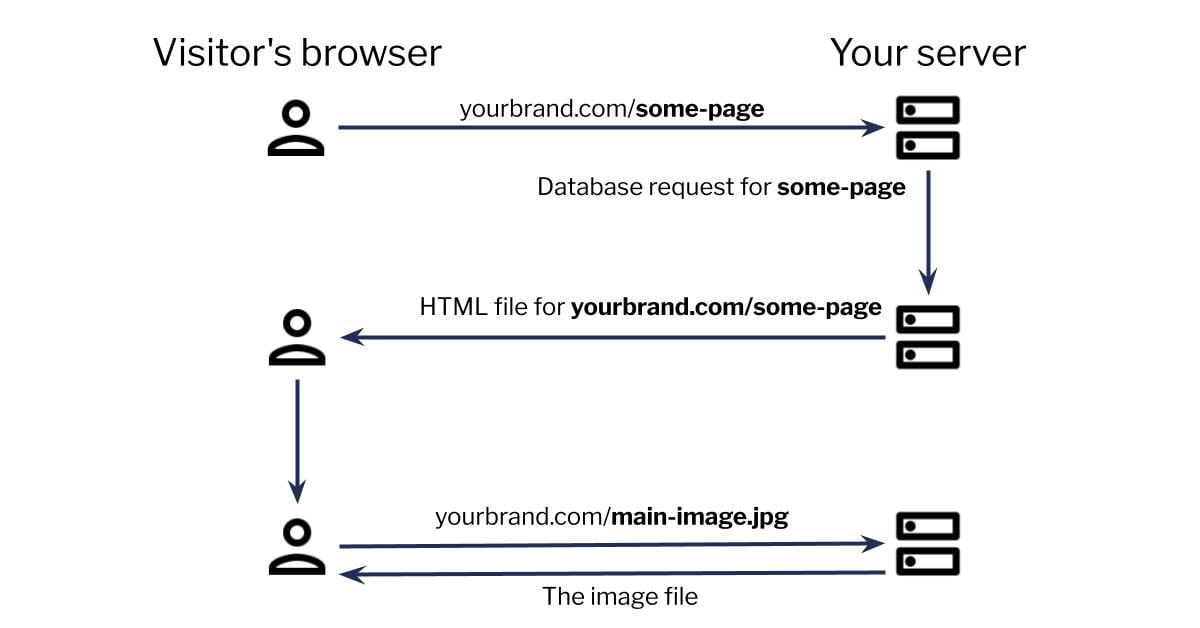
This can be a very inefficient process: often your website is built on the fly for each new user and all the resources keep getting computed and sent over and over again. Caching tries to shortcut this where possible by saving a copy.
- To speed up step 1, your server can pre-compute the HTML for each page so that the file is ready to go as soon as it’s requested, no database lookups needed. This may not work for logged-in users or pages where the content is genuinely personalised but for most public pages it’s a great idea.
- To speed up step 2, a Content Delivery Network (CDN) can store common files (ones which are requested a lot from your website) on their own servers which are usually much closer to the user than the server which actually hosts your website.
- To speed up step 3, when a user’s browser requests a resource (eg. an image), your server’s response can tell the browser to keep a copy of this file on the user’s device and next time just fetch it from there. This won’t save much time for someone’s first visit but will speed up returning visits by a lot.
Other tips for website speed improvement
- Lazy Loading is when certain elements (usually bulky items like images/videos that are below the fold) are not actually loaded until the user starts scrolling down to bring them into view. Otherwise the normal procedure is to fetch everything, even for a giant page with lots of items below the fold that don’t even get shown straight away.
- Page Prefetching is when the browser starts downloading the next page when you mouse over a link, or click it. Otherwise the normal procedure is for the browser to only request the page when the URL changes in the user’s browser. An even more aggressive approach is to pre-fetch a bunch of links that the user is likely to click on next during idle time. But then you should be aware of not wasting the user’s internet bandwidth: if they’re not on wifi and your page links to 20 sub-pages each 3MB in size then this would quickly chew up your user’s data.

You probably won’t need all of these but with a lot of website platforms if your website isn’t using at least some combination of the above you are likely to get a speed score of less than 40/100.

