

- The types of 3rd party services you might be using for your website
- The ways to integrate them with your website
- The options you have to control the look-and-feel as well as the data from these services.
While it’s still viable for personal websites and blogs, very few business/organisational websites these days are standalone, not integrating with any services. Here are some third parties that your website may integrate with.
| Type of tool | Examples |
|---|---|
| Payment processors | PayPal and Afterpay |
| Donation platforms | Raisely |
| Event management platforms | Eventbrite and Humanitix |
| Experience booking platforms | Rezdy and Fareharbor |
| Form builders | Typeform and Hubspot |
| Landing page builders | ClickFunnels and Instapage |
| Media players | YouTube, Vimeo and Soundcloud |
| Chat widgets | LiveChat and Tawk |
| Popup widgets | Wisepops |
There’s nothing wrong with using third parties, but you need to be aware of a couple of things:
- Will the branding experience be consistent for my visitors?
- Is this platform, which I may not have direct control over, easy to use?
- Will I be able to track user actions on this platform? (Very important if this platform is where your website conversions happen, eg. payment processor, chat widget or form builder).
For a surprising number of platforms the answer to some or all of these questions is “no” and we’ve seen cases where websites have committed to third parties that have completely limited their business growth without doing the research.
To do the research, you should first find out how exactly a platform integrates with your own website.
Below are the main options:
The platform adds HTML directly to your website
This is usually the best case scenario, this means that the platform’s output sits on your actual website. For example, a popup created by Sumo is actually on your page. This means you can do the following to it (possibly using a developer, but at least it’s feasible):
- Track it
- Modify the styling and layout
There may still be some functionality you may be unable to modify either on your page or on the platform but that’s a question of how suitable it is for you in the first place.
The platform is added to your website through an iframe
An iframe is essentially a third party website being embedded into yours. For security reasons your browser treats these as 2 separate websites joining up into one page:

This means that by default, the parent page (ie. your website) cannot have access to the iframe itself. Meaning you cannot:
- Track user interactions inside the iframe
- Modify the styling
Now there are some ways around this but they require dev work and not all platforms will do this:
- If a platform allows you to add your own Javascript to the iframe, the iframe can send a message back up to your website (eg. that a form has been submitted). An example of this case is Paperform.
- If a platform has a Javascript API, it might already be doing this in which case your website just needs to listen to the appropriate message. An example of this case is the YouTube player.
However a lot of platforms don’t allow any of this, so be aware before you commit to a platform where conversions are occurring!
The platform requires the user going to the platform’s own domain
Here, you have the least control and the least visibility on what your visitors do.
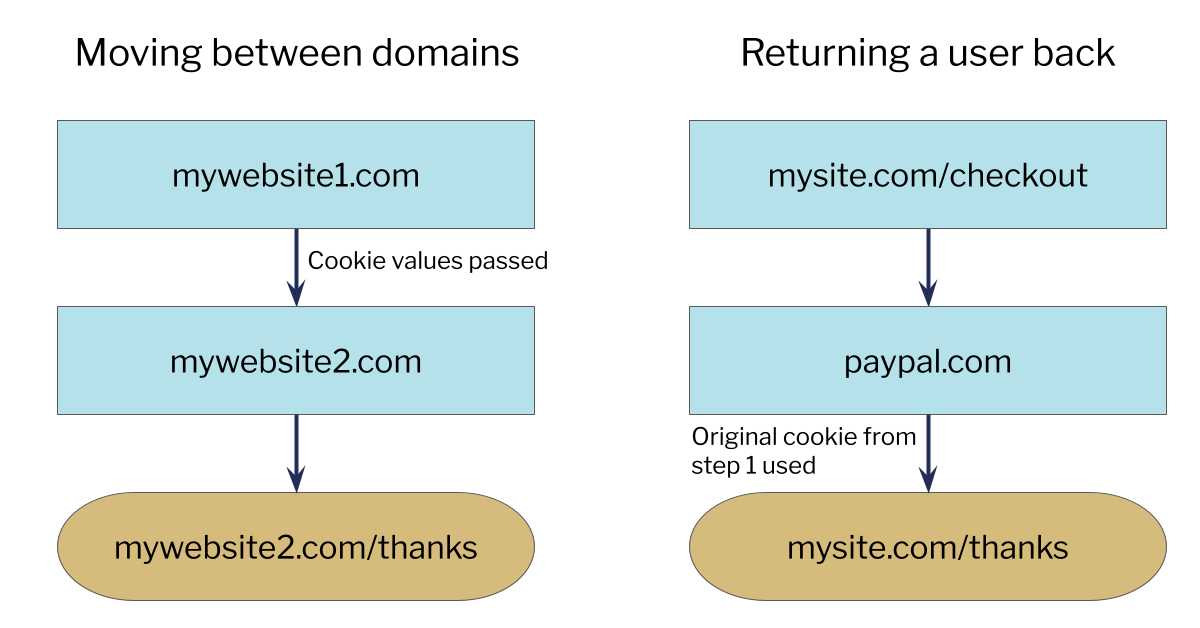
If the platform is nice enough, you can add your own analytics code to those pages so that your reports consider them as if they were part of your website. However many platforms don’t do this and for many analytics tools you will need to set up something called cross domain tracking to ensure that the user is tracked properly as they travel across domains. (Note that if the user goes to a subdomain of your website such as store.yoursite.com.au, most of these issues will disappear.)
If this isn’t available, there is another option. You can have the user returned back to your website when they’re finished (for example Paypal has an auto-return feature). This is good for branding too, you would want a custom thankyou page that can direct people to do other things (eg. sign up to a discounts newsletter). But then you probably still have to do some analytics configuration and add those third parties to an exclusion list (in Google Analytics it’s called referrer exclusion) so that it doesn’t treat that traffic as if it’s just arriving to your website. Otherwise it will show that paypal.com is the marketing channel that drove all the revenue.
If this all sounds complicated, it is! For some clients, dealing with 3rd party services causes about 60% of headaches. But if this service is essential to your business operation (eg. Paypal), not implementing these things would simply mean you don’t have the data you need about conversions to grow your business in a smart way.
Fill this out for third party integrations you have:

