
- What counts as a website page?
- How can you make sure that you don’t have too many or too few pages?
- Making a website plan to ensure that each page is pulling its weight
What’s a page?
This might seem simple enough but there are a few subtleties that will affect your website structure. One working definition for a page is ‘a unique set of content/functionality presented on a website’.
You should try to aim for a close relationship between the two, so each page has its own URL and each URL represents a unique page. Luckily almost every off-the-shelf CMS (eg. WordPress, Joomla, Squarespace, Wix etc) do this most of the time by default, although in advanced cases you may still run into exceptions that need fixing (see below).
Can you get by with just one page?
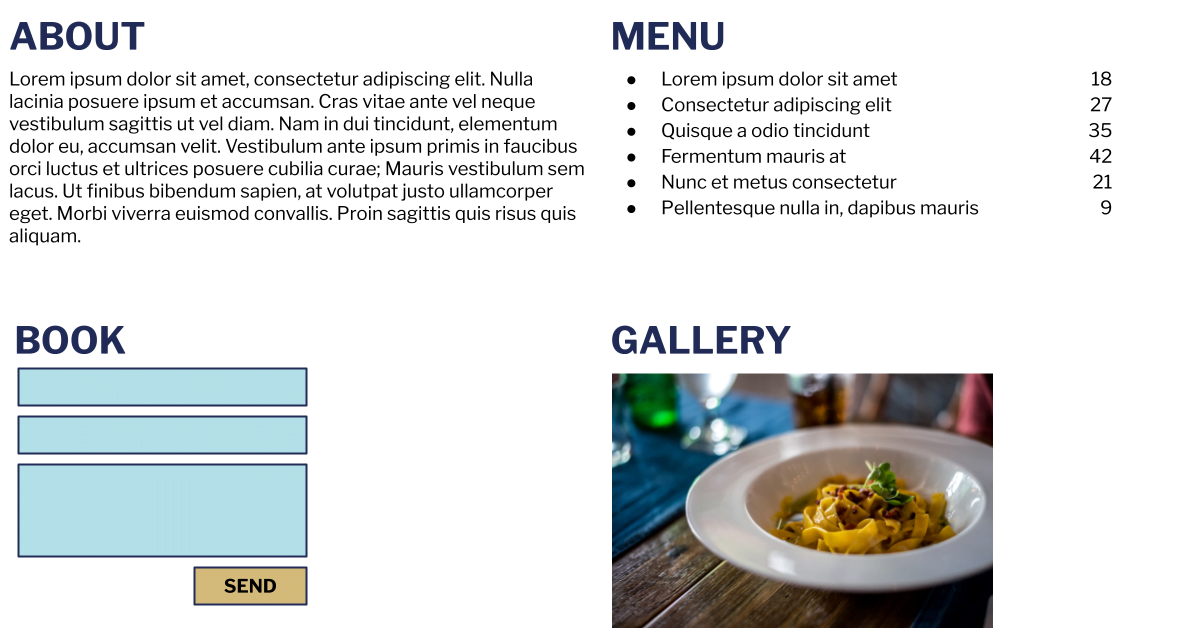
As we’ve seen, if you run a dynamic web app that you have to log into, maybe one URL and one page is fine. For a small website, we often see a single page that’s quite long and lists out sections that the user scrolls to (or is scrolled to if they click the navigation). For example for a restaurant you might have these vertical sections:
- About
- Menu
- Book/Order
- Gallery
You don’t need to have a one-to-one relationship but if you map a specific URL to a keyword theme this will help. Here’s a business for which a single page might not work as well – a beautician showcasing multiple services:
- About
- Facial Treatment
- Waxing Treatment
- Laser Skin Treatment
- Hair Removal
Now the last 4 are specific services so you would want to try rank for people searching for each specific service. Meaning that it may be better to have them on separate pages, to preserve the relationship between a keyword theme like “hair removal” with a specific page like mysite.com/hair-removal. If a search engine has multiple signals that a page is about this keyword theme (ie. you use it in the title, headline, copy etc) it’s more likely to rank it.
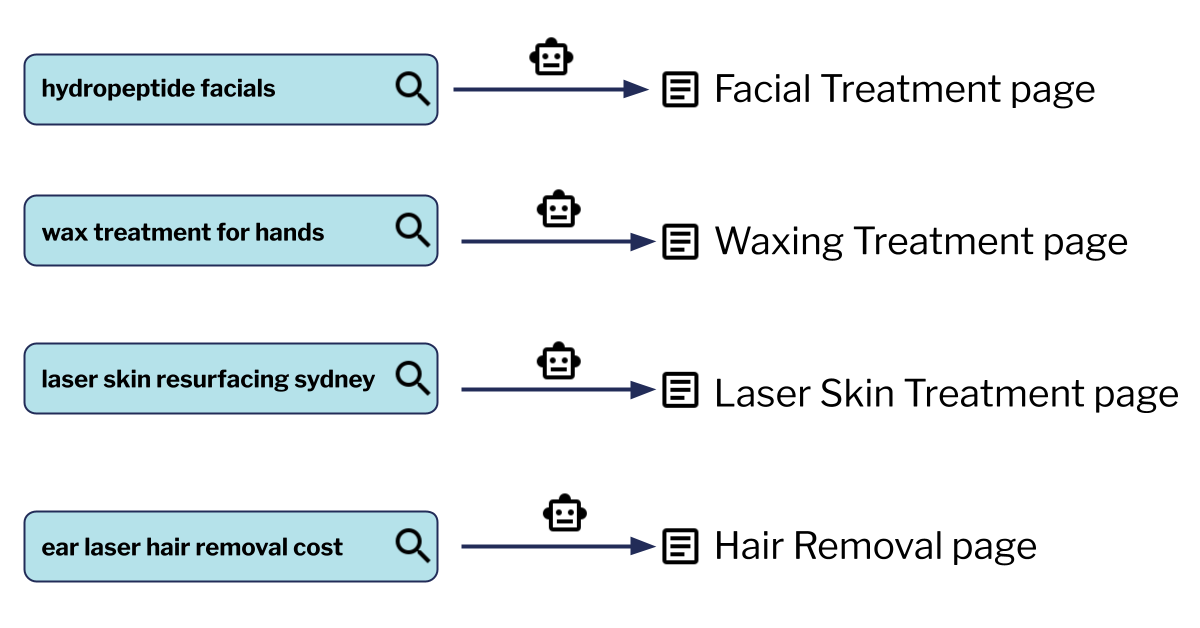
Search engines are of course getting better at understanding your page and they’re very good too, so this is not a hard and fast rule. But it’s usually still easier to rank with dedicated pages if they’re talking about different things. Another advantage is that on a dedicated page you have the space to really craft the message for each specific audience.
This is usually not hard to fix. If the beautician created tiles on the homepage for each of the 4 services linking to the dedicated page for those who want to read, they will have the best of both worlds – a concise homepage that provides a full overview as well as dedicated pages for ranking and landing page/advertising use.
This may be more challenging if your website is a dynamic web app. For example the fictional customtshirtdesigner.com could have pages like Home, My T-shirts, Design and Monetise all on the same URL. There are techniques for making such pages accessible to search engines but they require development. If your website is a web app, you will want to think about which pages should be accessible from day 1, otherwise you could be stuck with the cost of rebuilding parts of the app.
Do I have too few pages?
The consideration here is the same as the one page question.
- If you can think of a good, relevant potential user search which does not correspond to an obvious page (or there is a page but it doesn’t have that text on it), you may want to create it as a separate page.
- If you can also think of customised user messaging that would be relevant to people landing on your website from this search (or even browsing to a page with this content once they’re on your website), you may also want that customised user messaging to be on its own page.
Do I have too many pages?
Search engines today increasingly give preference to highly relevant content. Today and going into the future, highly relevant, quality content trumps quantity. As a result, having too many pages can hurt your website. The downsides are:
- Confusing user experience, as many people do use the URL to work out where in the website they are.
- Too many pages indexed by search engines which would result in:
- Search engines crawling your website less and hence your page listings in search results being out of date.
- Search engines ranking a different page to the one you want because they’re confused.
- Your overall rankings not being as good because of confusion, if search engines think your large number of pages is because you’re trying to spam them.
The biggest culprit is browse and search pages, especially if you can access items through many different criteria. At worst you can have a system that generates a near-infinite number of URLs, for example this list which you would not want search engines to try to index:
- mytshirtshop.com/browse/categories/cotton-unisex/?postcode=2000
- mytshirtshop.com/browse/categories/cotton-unisex/?postcode=2001
- mytshirtshop.com/browse/categories/cotton-unisex/?postcode=2003
Or an ecommerce store where you can put together different options in different ways to get pages that return the same products
- mytshirtshop.com/browse/categories/cotton-unisex/
- mytshirtshop.com/browse/categories/unisex-cotton/
You can also split the pages according to the previous heading’s recommendations but go overboard. For example if you’re a plumber and you have 5 main service pages but also service all 433 suburbs in greater Adelaide, it would be excessive for you to have one page per suburb listed on Google, saying that you service it. Then only 1% of the pages on your website would have substantial unique content and search engines will know this. So you’d want to make sure any automated or dynamic generation of pages generates unique value. For example if you’re a directory website then it may make sense to have 433 pages for all the suburbs since each page will list different products/services on it.
- Not having the bloated pages in the first place (eg. restricting the number of unique URLs that your website can have).
- Allowing these URLs but asking search engines not to index them (see chapter 18 for more details). For example the plumber may want one page per suburb if they’re running ads to those pages, but they might still be too similar for search engine indexing.
- Using the canonical tag to tell search engines that different URLs are actually the same page (see chapter 18 for more details).
Do you have a website plan?
You need one. For a small website it can list each page explicitly. For a medium or large website you might need the plan to cover entire categories of pages. For example a food delivery website will typically need to have at least the following pages:
- Homepage
- Contact us page
- Search results page (this would be a template, potentially representing thousands of pages)
- Restaurant listing/ordering page (this would also be a template)
- Checkout page
- Order confirmation page
- User login page
- User order history page
Even if you have an existing website that you think works well, you should make a plan for it. This will help clarify your thinking about how the pieces fit together and will probably suggest areas of improvement.
Does each page/section of your website have a clear purpose and CTA?
If you look at the above page listing, every type of page will have a clear purpose and call to action. For the homepage, it would be to explain what the service does and get the user to search. Other pages might have a dual purpose, for example a restaurant page’s purpose would be to showcase the restaurant’s menu, pricing and specials as well as getting people to create an order. It’s all about getting your customers to the things they need, as easily as possible.

It’s the same for your own website. Each page or section’s purpose and call to action should be documented in your website plan. If a page is not pulling its weight or does not have a clear purpose doing this exercise will make that clear.
Below is an example website plan for the beautician example earlier in the chapter:
| Page | Purpose | Content to fulfill purpose | Call(s) to Action |
|---|---|---|---|
| Home | 1. Establish credibility 2. Choose treatment type | 1. Testimonials 2. 4 treatment tiles | Click a tile |
| Facial Treatment | 1. Provide treatment info 2. Choose to book | 1. ‘What’s included’ table 2. Award image | Click Book button |
| Wax Treatment | As above | As above | As above |
| Laser Skin Treatment | As above | As above | As above |
| Hair Removal | As above | As above | As above |
| Book | Complete booking | Easy to fill form Logos of payment methods | Submit form |
| Thanks | Peace of mind Social visit | Booking ref number Social logos | Click social links |
If you haven’t done so already you can create your own website plan. If you have lots of similar pages (eg. a destination page for each major city in Australia), one row would be enough since typically all instances of the page would have the same purpose, content and calls to action.

