
- What are some realistic expectations for your SEO?
- Adding/removing pages to a search engine’s index
- Writing SEO-friendly copy and metadata for your pages
- Structured data
More and more people have websites which means they are familiar with some concepts in search engine optimisation (SEO). And there are lots of great resources and tools out there catering to all sorts of levels of experience, many free. What’s probably more difficult is putting things into context with respect to what’s likely to be of benefit to you.
Overall, there is no shortcut. Not anymore. And as tempting as it can be to reply to the hundreds of offers in your spam folder to solve your SEO problems overnight, in most cases, you really are the best person to lead your SEO strategies.
How much success can you expect from organic traffic?
The answer depends wildly on what your website does as well as the competitive landscape. It also depends a lot on your marketing plan, which is beyond the scope of this book. However, you will likely fall into one of these categories:
- Your primary marketing will be word of mouth and other close networks of people. In this case your main SEO concern is making sure that people who are searching for you by name find you. In which case your choice of a memorable and appropriate domain name (chapter 3) may be more important than anything in this chapter.
- Your traffic will come from a range of sources but you also want people to find you by searching for the products/services you offer. Here, you want to spend time on SEO but you will need to go beyond the items in this chapter to offline and online business relationships, partnership and other marketing channels.
- Your marketing plan consists mainly of people who haven’t heard of you searching for your products/services, finding you and loving your website. Here, your differentiation from your competition will be crucial, without it even following all the notes below may not build significant traffic.
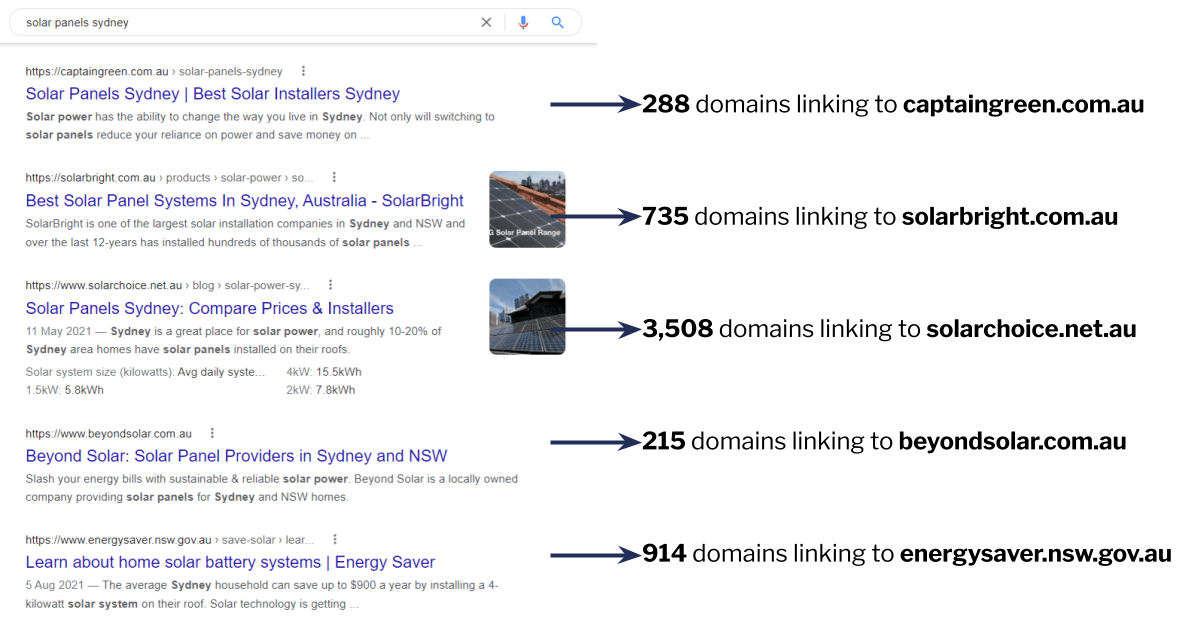
Also beyond the scope of this book is off-site SEO, ie. executing the types of campaigns that will increase your chances of ranking. A huge factor in how search engines rank websites is having a wide, diverse and quality range of websites linking to yours. While there are things you can do to help, ultimately it’s about the website itself. Is it the type of website that someone might create a backlink to, unsolicited? If not then your SEO options may be limited.
Getting your website indexed
- Allow robots to crawl your website: This is done with a file your website hosts called robots.txt (more info here). It’s quite common to disallow crawling during the build of a website and we’ve seen plenty of cases where this is forgotten during launch!
- Be intentional about which pages should be indexed: When a bot goes to your page, it also needs to decide if it will index it. By default they will, but you can also specify whether you want the pages indexed or not in the code of the page itself. Your CMS will typically have the explicit instruction set to index, but you should be able to change it to pages there’s no point in trying to feature in search engine indexes (eg. your privacy policy page or a purchase thankyou page).
- Use a sitemap: If you have more than a few pages you will also want a sitemap, which will tell search engines about every URL on your website, and will be the first place they check for new pages. Almost all CMSes will generate this sitemap automatically although you may need an add-on or plugin. The only thing you need to be aware of is that you should submit the sitemap to search engines directly inside Google Search Console or Bing Webmaster Tools. It’s important to sign up to these accounts in any case since it’s the search engines’ main way to notify you about any issues with your website that might be impacting rankings.
- It’s not all Google: Finally, don’t neglect search engines that are not the market leader! For example, Bing has a lower market share in most countries but its visitors are likely to convert better, at least in our experience across multiple industries.
Instead, you should change your page’s instructions to bots to not index the page. Or just delete or password-protect the page. You can also file an expedited removal request from Google Search Console but this is temporary and only intended for urgent items such as legal takedowns, to be done in parallel with the other methods.
Mapping queries to pages
- This has to do with your website structure (see chapter 9). Basically for each search query that would be relevant for your website, you would want to have one clear page that’s the obvious best match for the query. For a large website it’s unavoidable that there will be other contenders but if there are many pages that seem equally relevant that’s a duplication problem and a sign that you may need to consolidate.
- You should investigate this by going through your Google or Bing webmaster/console reports and looking at (A) which keywords are triggering your website to show in search results and (B) which pages are being shown. You will be able to see if the same query is triggering lots of different pages in which case it’s time to revisit the website structure as per the details in chapter 9.
Metadata and keywords
- Use meta titles for keywords and calls to action: Of your meta tags, your meta titles have one of the largest effects on what keywords the page is likely to rank for, but you probably want to incorporate your brand and possibly a call to action too. Take note of the space you have available by using one of the many preview tools around.
- Use your meta descriptions for additional information and calls to action: Your page’s meta descriptions don’t directly affect rankings but will often be used by search engines if your page appears. Ideally they will explain what’s on your page in a way that’s compelling enough for people to click through. You often want a call to action here especially if the full one doesn’t fit into the title.
- Other places to use keywords are your headlines, bullet point lists and actual body copy.
- Using canonical tags: If you are going to have lots of pages or articles you will probably want to be using the canonical tag. This tells search engine crawlers what the authoritative URL for a page is. For example the URL /articles/top-10-chihuahuas?from=nav-menu might have a canonical URL of /articles/top-10-chihuahuas, which would tell the search engine to ignore the “from=nav-menu” part of the URL). This is useful in collapsing minor variations of a page (or alternate URLs with tracking parameters) in order to prevent them from being confused with the page you’re actually trying to rank.
Structured data
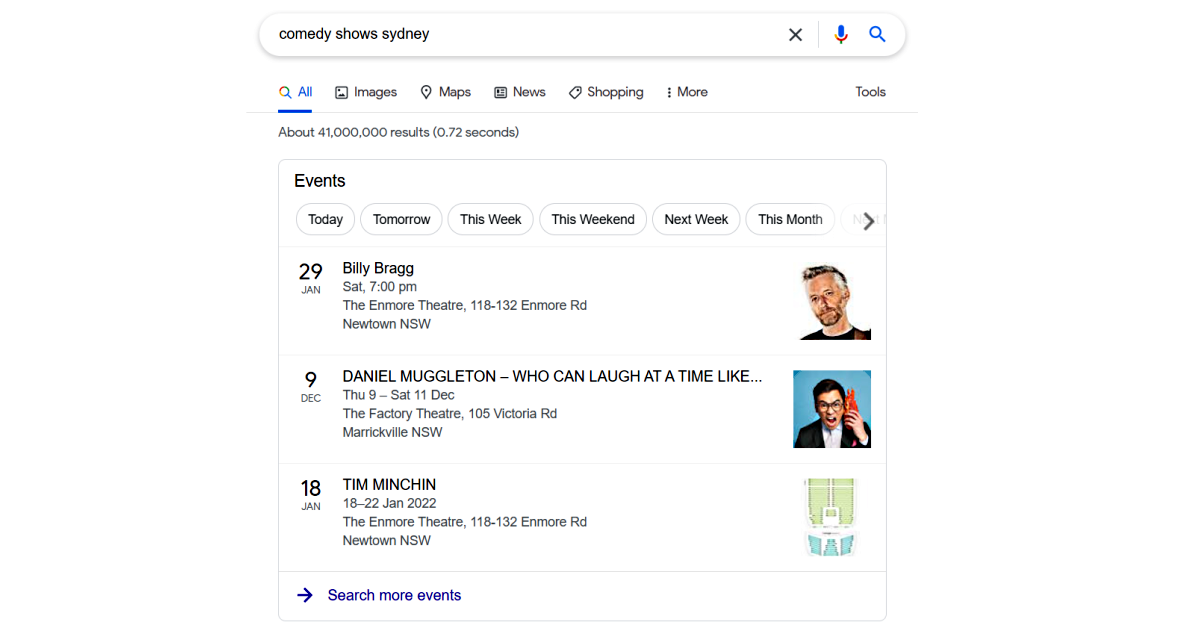
- This is the markup of your page with certain code that tells search engines what types of things are on your page. This helps them showcase your page in search results, especially for queries where search engines render special results (eg. an event from your website being shown in a Google listing of events with the event dates).
- The full list of structured data you can implement can be found on Schema.org but it’s pretty long and detailed and most things aren’t [yet] directly supported by search engines.
- You will also want to cross-reference this with the list of snippets that search engines actually render, for example the table by Google provided on this page. These will keep growing over time.
- Implementing these will not directly improve your rankings but it may help you get more clicks on your listing.
- Your website CMS will typically support the basic ones, for example an ecommerce platform would (hopefully) generate product structured data on product pages. But for others you may need to implement add-ons or custom coding.
Internal links
- Use anchor text: Like external links, internal text links are important to your rankings because they affect how search engines understand your page. The part of a link that’s underlined is called the anchor text and typically having an anchor text will help you rank for that search.
- Dont be gimmicky: You should NOT over-optimise or create lots of different links to the same page with different anchor text or anything like that. Search engines are looking for links that are written in a natural way.
- The best internal links are the ones real people will click: The most common places for you to have internal links that affect rankings are the nav menu, inline links, the sidebar etc. The footer is ok but search engines know that a lot of websites stuff their footer with useless links for SEO purposes that nobody actually clicks on, so they will typically be more wary of those.
- Use descriptive language: If you are descriptive with your anchor text this should be enough. For example a car dealer might have a finance page on their website and calling it “Finance” in the menu is fine. But calling it “Car Finance” is slightly more descriptive and hence might be a better internal link. As you can see, it’s very easy to go overboard so the final content should always be copy you can stand by.
Fill this table out for the top few pages of your website:

