

With very little time left until Universal Analytics goes away and everyone needs to transition to GA4, we’ve been getting a lot of questions about how the engagement metrics differ, since they do have some important differences.
Default engagement metrics in Universal Analytics
It’s worth doing a quick intro on what these are since a lot of people in marketing still use these to talk about their website. This is how Universal Analytics measures bounces and time:
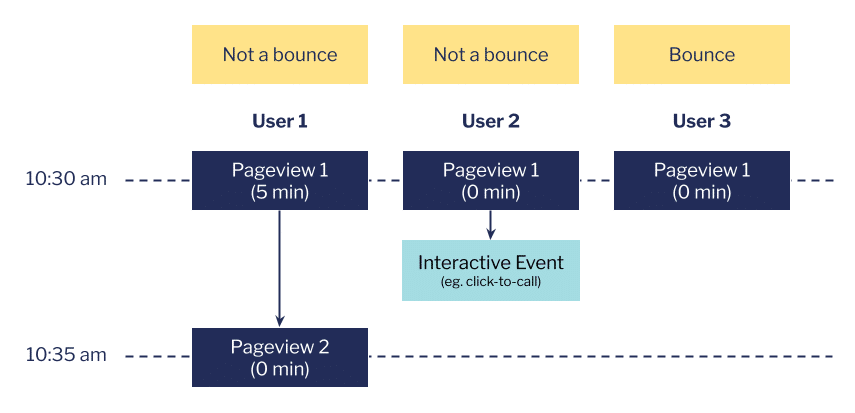
At 10:30, 3 people landed on a page of your website. User 1 clicked to a 2nd page 5 minutes later. User 2 performed another event that you’re tracking (in this case Click To Call) and user 3 did neither. How does Universal Analytics measure these users’ engagement?
- User 1 has more than 1 pageview so their session is not a bounce. They also have 5 minutes of attributed time on page 1 (10:35 minus 10:30).
- User 2 also has more than 1 pageview because of their click to call, but no second page. With no second timestamp, GA allocates them a time of 0, but it’s not a bounce.
- User 3 only has 1 pageview so it’s a bounce. Because there are no other timestamps, GA also allocates them a time of 0.
These metrics are better than nothing but you can see they have a bunch of problems:
- They do NOT measure how long people spend engaging with your content. User 1 might have had their tab for page 1 open for 5 minutes but they could have been on another tab for most of that time. Consider how many tabs you have open now.
- The last page of each user’s session always has a time of 0. Confusingly the average session duration metric includes these zeros but average time on page does not, so the first will always be much lower than the second.
- Bounce rate is NOT a measure of how often people leave your website straight away (although these will be included). User 3 could have spent an enthralled hour reading your page.
- As you start tracking additional events [unless you’ve marked them as non-interactive], your bounce rate will go down. For example, it’s only because we’re tracking the click to call event that user 2 is not considered a bounce.
Default engagement metrics in GA4
In order to deal with how people actually browse the internet, GA4 has revamped how it measures engagement.

- First thing you’ll see is no more timestamps and the times are much lower. That’s because GA4 measures the actual active time a user spends on a page so if, say, the tab is in the background, it doesn’t count. It does this by sending the total engaged time alongside other events, along with a final event called user_engagement when the user is about to leave a page, which is designed just to send that final number and is useful for tracking people who just read a page and then leave the website.
- User 1 has 2 pageviews so their session is engaged (opposite of a bounce) regardless of duration.
- User 2 has a conversion event (these are events you label as conversions on the Conversions screen) so their session is also engaged regardless of duration.
- User 3 has had at least 10 seconds of active time so their session is also engaged regardless of how many other events they have or how many pages they’ve seen.
- User 4 has none of those things (less than 10 seconds, no conversion events, only one page) so their session is not engaged – a bounce!
- Engagement time is a genuine (if humbling) metric of how long people are active on your website.
- Bounces genuinely measure people who leave the website straight away.
If anything the current definitions of a bounce are probably too narrow as it might be too low to be meaningful for your website. To get around this we often implement an additional event when the user has stayed for 30 seconds and scrolled 50% of a page, for this see our article on tracking engaged pageviews.

